What small business cloud accounting software covers now
When a US small business owner goes shopping for small business cloud accounting software, the checklist usually includes invoicing and billing, bank feeds and reconciliation, expense capture, sales tax, financial reporting such as a profit and loss statement and a balance sheet, inventory, payroll or a payroll integration, and access for more than one person. The first four items are close to commodity. The purchase is usually decided by the rest of the list.
The category has also split on price in a way it had not five years ago. Some vendors now give away a genuinely usable hosted plan. Wave's free Starter plan covers unlimited estimates, invoices, bills, and bookkeeping records (Wave pricing), and Zoho Books stays free indefinitely while your financial-year revenue remains under $50,000, with one user plus your accountant and up to 1,000 invoices a year (Zoho Books pricing). Paying monthly is now a decision about automation and limits, not the price of admission to the cloud.
Start with the access model, not the feature list
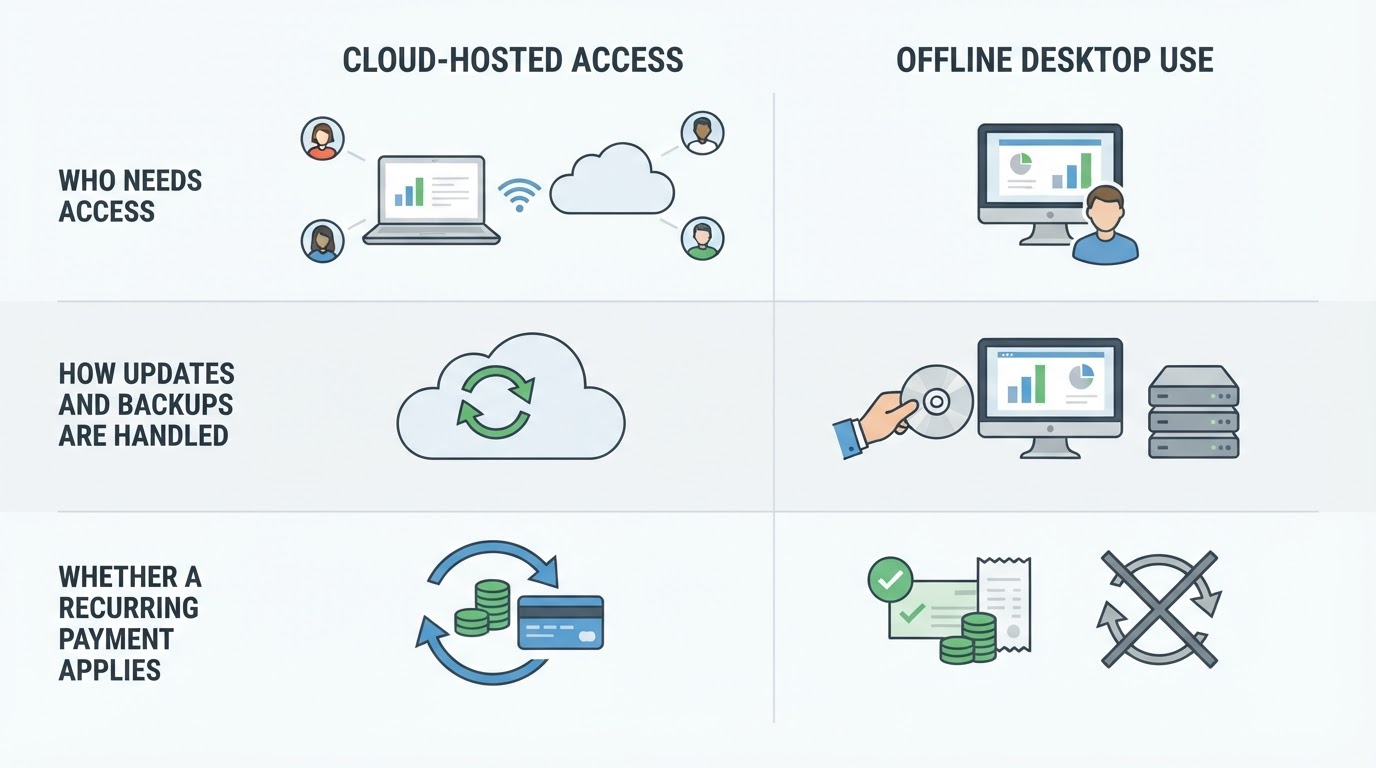
Cloud-hosted access earns its place when more than one person touches the books, when your bookkeeper or accountant works from somewhere else, when you want bank transactions to arrive on their own, when you would rather not run your own backups and updates, and when you invoice from a phone or a laptop.
Offline or desktop deployment still fits when a single workstation does all the bookkeeping, when connectivity is unreliable, when the data file has to live on your own machine, when you have deliberately decided against a recurring software charge, or when a legacy workflow locks you to a desktop title.
Two cautions before you treat that as a clean either-or. First, "desktop" no longer automatically means "no subscription" — several established desktop products are now licensed annually, so a desktop shortlist can carry the same recurring cost as a cloud plan. Second, whichever access model you pick, the compliance question is separate. The IRS does not require any particular recordkeeping system; you may use paper, spreadsheets, or software as long as the records clearly show your income and expenses, and you must keep them as long as needed to prove the income or deductions on a return (IRS recordkeeping guidance). Access model is a workflow decision, not a tax one.
The comparison list: ten dimensions that decide the purchase
Score every shortlisted product against these dimensions, and score them in the same order for each product so the comparison stays honest.
Dimension | What to verify | Why it decides the purchase |
|---|---|---|
Access model | Cloud, desktop, or hybrid; which devices and how many people can sign in at once | Determines whether your bookkeeper, partner, or store manager can work in the books |
Pricing model | Subscription, permanent free tier, one-time license, or a mix | Sets your cash-flow shape and your exit cost |
Included modules | Invoicing, bills, sales tax, inventory, projects, payroll or payroll integration | Prevents paying twice for a module you assumed was included |
Seats and per-user cost | Users included in each tier and the price of an extra seat | Growth can push you into a higher tier before you notice |
Bank feeds and reconciliation | Automatic import, rules, and how quickly you can match transactions | This is the daily task you will repeat hundreds of times a year |
Offline capability | What still works without internet, and what breaks | Decides whether one bad connection day stops your billing |
Data export and exit path | Export formats, how many years of history, and whether export is plan-limited | Your leverage if prices rise or the product stops fitting |
Integrations | Payments, payroll, CRM, ecommerce, and time tracking | Every manual bridge you build is a monthly cost |
Security and backup | Encryption, multi-factor authentication, backup and restore | Zoho Books, for example, states that it uses two-factor authentication and SSL encryption |
Support and 3-year cost | Support channel per tier, plus add-ons, payment fees, and taxes | The list price is rarely the amount you actually pay |
Now put the same ten dimensions to work on real options. All figures below are the list prices and limits published on each vendor's own pricing page; confirm them on the vendor's page before you decide, because US vendors adjust tiers and prices often.
Option | Published entry point | What changes as you move up |
|---|---|---|
Wave | Starter is free; Pro is $19 US per business per month | Free covers unlimited invoices, bills, and manual bookkeeping records; Pro adds automatic bank import, auto-categorization, and unlimited receipt capture, and removes the fixed card fee for the first ten transactions each month |
Zoho Books | Free plan; Standard is $15 per organization per month billed annually for 3 users | Free is capped at one user plus your accountant, 1,000 invoices a year, and revenue under $50,000; additional users cost about $2.50 to $3 each per month; paid tiers add sales tax tracking and bank feeds, then inventory, purchase orders, and multi-currency |
FreshBooks | Lite is $23 per month (FreshBooks pricing) | Lite covers 5 billable clients; Plus at $43 raises that to 50 clients and adds bank reconciliation and double-entry accounting reports; Premium at $70 removes the client cap |
Xero | Three US plans — Early, Growing, and Established — priced per organization in US dollars before tax | The Early plan caps invoices: the limit counts invoices you approve and send, and transactions created by connected apps can count toward it, so most businesses outgrow it; you can move to a cheaper plan one month after an upgrade |
Subscription versus no-subscription, item by item
Cash flow and predictability. A subscription spreads the cost evenly and keeps the software current. A one-time license front-loads the payment but leaves you responsible for updates, backups, and any connected service the vendor later sunsets.
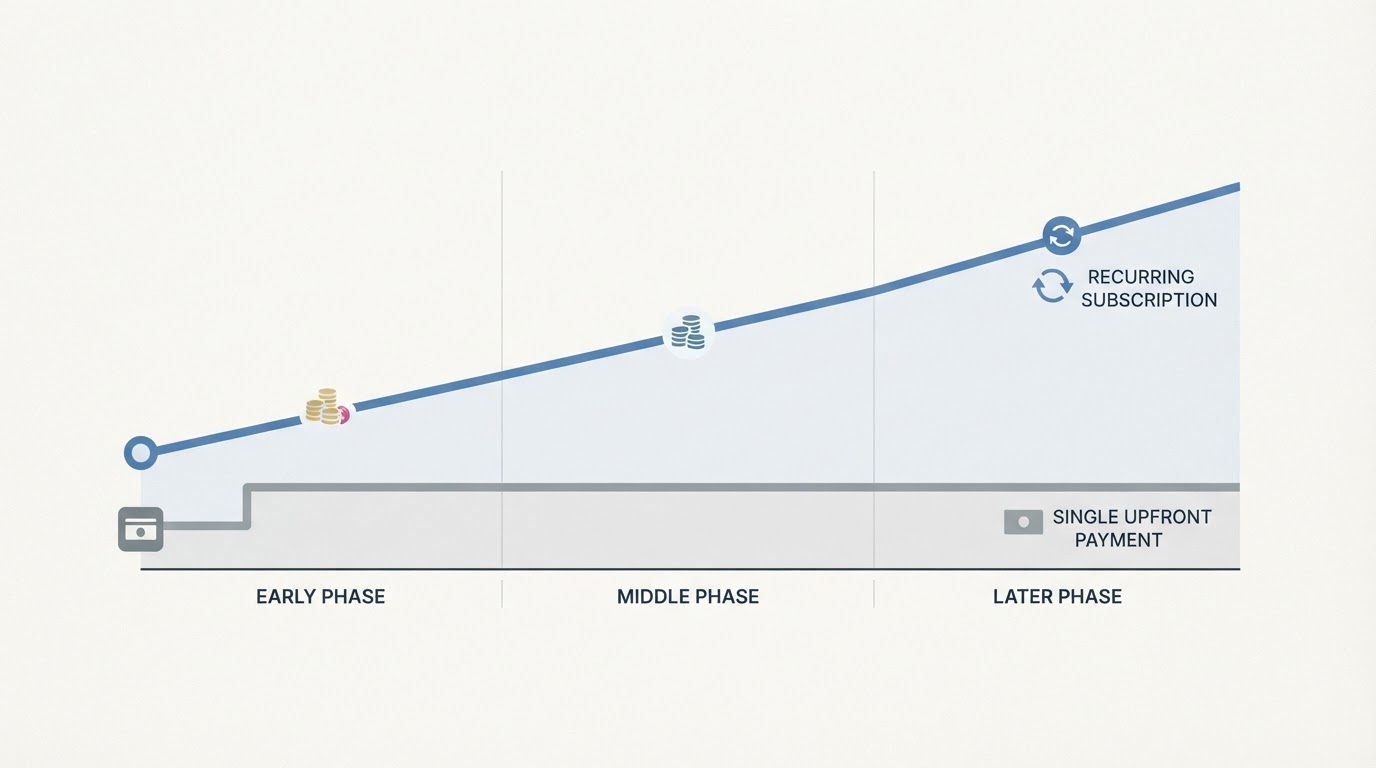
Who owns the updates. Subscriptions bundle feature updates and, critically, compliance changes such as tax tables and filing rules. On a versioned desktop title, you decide when to upgrade, and the version you bought keeps working only for as long as its connected services survive.
What happens when you stop paying. With cloud plans, access generally ends when payments stop. Xero states that its subscriptions auto-renew monthly until cancelled and that you can move to a less expensive plan one month after upgrading (Xero US pricing); Wave states that its subscriptions auto-renew and can be cancelled at any time. Ask each vendor for the renewal date, the notice period, and the downgrade rule.
Scaling seats and clients. Per-user pricing turns hiring into a recurring cost: Zoho Books sells additional users as an add-on at roughly $2.50 per user per month billed annually, and FreshBooks gates the number of billable clients by tier — 5 on Lite, 50 on Plus, unlimited on Premium. Model your headcount before choosing the cheapest tier.
Ceilings that force an upgrade. Free and entry tiers carry hard limits, not soft ones. Zoho's free plan allows 1,000 invoices a year and stops being free above $50,000 in revenue; Wave's free Starter plan leaves bank imports for Pro; Xero's Early plan counts both invoice approvals and sends against its cap.
Costs that survive the switch. Payment processing is the biggest hidden line: Wave charges 2.9% plus $0.60 per credit card transaction on Starter, with a reduced rate for the first ten monthly transactions on Pro. Payroll add-ons start at $25 per month at Wave, add-ons at FreshBooks are priced separately, and Xero lists its prices before tax. Add all of that into a one-year and three-year total, and include the cost of leaving: what it takes to export your history and start elsewhere.
Free tools and resources worth one afternoon
- A permanent free hosted plan. Wave Starter and the Zoho Books free plan are real products, not trials. Use one to learn the workflow, the chart of accounts, and the reconciliation routine before you pay anyone.
- A time-boxed trial. Zoho offers a 14-day free trial, and FreshBooks pairs a 30-day trial with a 30-day money-back guarantee. Give yourself a fixed week, not an open-ended evaluation.
- Spreadsheet templates for cash flow and basic bookkeeping. Free templates are enough until invoice volume, sales tax, or inventory tracking outgrows them — and they force you to understand your own numbers.
- A data-export test. Ask each vendor which export formats it supports (CSV, OFX, and QIF are common) and how many years of history you can take with you. Free plans frequently limit exports.
- Official recordkeeping guidance. The IRS states that you must be able to prove certain elements of expenses in order to deduct them, and that employment tax records should be kept for at least four years. That is free, authoritative, and cheaper than reconstructing a year under audit.

A five-step evaluation routine that fits in an afternoon
- Write your must-have task list. Monthly invoice count, bills, sales tax, inventory, payroll, and the number of people who need access. Be specific: "about 40 invoices a month, two users, quarterly sales tax" beats "small business needs".
- Run the same three to five real transactions in every candidate. One invoice with tax, one bill, one customer payment, one bank reconciliation. Identical input is the only fair comparison.
- Test the export before you commit. Export a report and a transaction list, open both files, and check that the amounts survived.
- Verify migration scope. How many years of history will the vendor move, what does the migration cost, and who checks the opening balances afterward?
- Check support and exit terms. Send the same support question to each vendor and time the reply. Then confirm the renewal date, the cancellation notice, and the downgrade rule.
The decision checklist
Score each finalist from 1 to 5 on access model, monthly cost at your real seat count, export control, must-have modules, and support responsiveness. Treat a 1 on a must-have as disqualifying regardless of the total, and let the scores pick the winner instead of the demo.
Then choose by your own scenario rather than by a universal ranking: a solo service business with low invoice volume can run a free hosted plan for another year; a five-person team with a remote bookkeeper should price a cloud tier at five seats, not at the starting tier; a single workstation with poor connectivity and no appetite for a recurring fee should look at a desktop or a free desktop tool with disciplined backups.
Pull the official pricing pages for your shortlist, run the three-transaction test, and the trade-offs above will usually make the decision obvious — or make it clear that the free plan is still enough.